To The Cloud and Beyond...

I was having a conversation with an old colleague late Friday afternoon.    (Friday was a day of former colleagues, had lunch with a great mentor).   He’s responsible for infrastructure and operations for a good size company.    His team is embarking on a project to migrate to the cloud as their contract for space will be up in 2020. There three things which were interesting in the discussion which I thought were interesting and probably the same issues others face on their journey to the cloud.

The first was the concern about security.    The cloud is no less or more secure than your data center. If your data center is private your cloud asset can be private, if your need public facing services, they would be secured like the public facing services in your own data center.    Data security is your responsibility in the cloud, but the cloud doesn’t make your data any less secure.

The other concern was the movement of VMware images to the cloud.   Most of the environment was virtualized years ago.   However, there are a lot of windows 2003 and 2008 servers.    Windows 2008  end of support is  2020, and Windows 2003 has been out of support since July 2015.     It’s odd the concern about security, given the age of the Windows environment.      If it was my world, I’d probably figure out how to move those servers to Windows 2016 or retire ones no longer needed, keeping in mind OS upgrades are always dependent on the applications.   Right or wrong, my roadmap would leave Windows 2003 and 2008 in whatever datacenter facility is left behind.

Lastly, there was concern about Serverless, and the application teams wanting to leverage this over his group’s infrastructure services.   There was real concern about a loss of resources if the application teams turn towards Serverless, as his organization would have fewer servers (physical/virtual instances)  to support.  Like many technology shops, infrastructure and operations resources are formulated by the total number of servers.   I find this hugely exciting.    I would push resources from “keeping the lights on” to roles focused on growing the business and speed to market, which are the most significant benefit of serverless.   Based on this discussion, people look at it from their own prism.
I was having a conversation with an old colleague late Friday afternoon.    (Friday was a day of former colleagues, had lunch with a great mentor).   He’s responsible for infrastructure and operations for a good size company.    His team is embarking on a project to migrate to the cloud...

Power of Digital Note Taking

There hundreds of note taking apps.    My favorites are Evernote, GoodNotes, and Quip.   I’m not going to get into the benefits or pros and cons of each application.  There plenty of BLOGs, youtube videos which do this in great detail.    Here is how I used them:

  • Evernote is my document and note repository.

  • GoodNotes is for taking handwritten notes on my iPad, and the PDFs are loaded into Evernote.

  • Quip is for team collaboration and sharing notes and documents.

I’ve been digital for 4+ years.  Today, I read an ebook from Microsoft, entitled “The Innovator’s Guide to Modern Note Taking.“  I was curious as to Microsoft’s ideas on the digital note-taking.   The ebook is worth a read.    I found there three big takeaways from the ebook:

First - The ebook quotes, “average employee spends 76 hours a year looking for misplaced notes, items, and files.   In other words, we spend annual $177 billion across the U.S”.

Second - The ebook explains that the left side of the brain is used when typing on a keyboard,  and the right side of the brain is when writing notes.  The left side of the brain is more clinical, and the right side of the brain is more creative, particular asking the “What If” questions.  Also covered on page 12 of the ebook handwriting notes improves retention.  Lastly on page 13 one of my favorites as I am a doodler, “Doodlers recall on average 29% more information than non-doodlers”.   There is a substantial difference in typing vs. writing notes, and there is a great blog article from NPR if you want to learn more.

_Third - _Leverage the cloud, whether it’s to share, process, access anywhere.

Those are fundamentally the three reasons that I went all digital for notes.  As described before I write notes in GoodNotes and put them in Evernote, I use the Evernote OCR for PDFs to search them.    My workflow covers the main points described above.   Makes me think I might be ahead of a coming trend.

There hundreds of note taking apps.    My favorites are Evernote, GoodNotes, and Quip.   I’m not going to get into the benefits or pros and cons of each application.  There plenty of BLOGs, youtube videos which do this in great detail.    Here is how I used them:

...

Multi-cloud environments are going to be the most important technology investment in 2018/2019

I believe that Multi-cloud environments are going to be the most important technology investment in 2018/2019.   This will drive education and new skill development among various technology workers.  Apparently, it’s not just me, IDC prediction is that “More than 85% of Enterprise IT Organizations Will Commit to Multicloud Architectures by 2018, Driving up the Rate and Pace of Change in IT Organizations”.There some great resources online for multi-cloud, strategy, benefits, all worth reading:

The list could be hundreds of articles.   I wanted to provide a few, that I thought were interesting and relevant to this discussion of why Multi-cloud.   There are four drivers behind this trend:

First -  Containers will allow you to deploy your application anywhere, including all the major cloud players have Kubernetes, Docker support.    This means you could deploy to AWS, Azure, and Google without rewriting any code.    Application support, development, maintenance is what drives technology dollars.   Maintaining one set of code that runs anywhere doesn’t cost any more and gives you complete autonomy.

Second -  Companies like JoyentNetlify,  HashiCorp Terraform and many more are building their solutions for multi-cloud, giving the control, manageability, ease of use, etc.    Technology is like Field of Dreams, quote, “if you build it they will come.”   Very few large companies jump into something without support, they wait for some level of maturity to be developed and then wade in slowly.

Third -  The biggest reason is a lack of trust putting all your technology assets into one company.    Most companies had for years multi-data center strategies, using a combination of self-created, leverage multiple companies like  Wipro, IBM, HP, Digital Realty Trust, etc., and various co-location.   For big companies when the cloud became popular, it was how do I augment my existing environment with Cloud.    Now many companies are applying a Cloud First Strategy .    So why wouldn’t principles that were applied for decades in technology, be applied to the cloud.   Everyone remembers the saying, don’t put all your eggs in one basket.    I understand there are regions, multi-AZ, resiliency, and redundancy, but at the end of the day one cloud provider is one cloud provider, and all my technology eggs are in that one basket.

Fourth - The last reason is pricing.   If you can move your entire workload from Amazon to Google within minutes, it forces cloud vendors to keep costs low as cloud service charges for what you use.   I understand if you have a workload with petabytes of data, it’s not going to move.  But have web services with small data behind them, they can move and relatively quickly with the right deployment tools in place.

What do you think?   Leave me a comment with your feedback or ideas?

I believe that Multi-cloud environments are going to be the most important technology investment in 2018/2019.   This will drive education and new skill development among various technology workers.  Apparently, it’s not just me, IDC prediction is that “More than 85% of Enterprise IT Organizations Will Commit to Multicloud Architectures by 2018, Driving...

AWS Certified Security – Specialty


Sat the AWS Certified Security - Speciality Exam this morning.  The exam is hard, as it scenario based.   Most of the exam questions were to pick the best security scenario.   It could be renamed the Certified Architect - Security.    Every one of those questions had 2 good answers, it came down to which was more correct and more secure.       It’s the hardest exam I’ve taken to date.   I think it is harder than the Solution Architect - Professional exam. The majority of the exam questions where on KMS, IAM, securing S3, CloudTrail, CloudWatch, multiple AWS account access, Config, VPC, security groups, NACLs, and WAF.

I did the course on acloud.guru and I think the whitepapers and links really helped me in the studying for this exam:

The exam took me about half the allocated time, I read fast and have a tendency to flag questions I don’t know the answer to and come back later and work thru them.    This exam, I flagged 20 questions, highest of any AWS exam taken to date.     Most of them I could figure out, once I thought about them for a while.      Thru the exam, I was unsure of my success or failure.

Upon submission, I got the “Congratulations! You have successfully completed the AWS Certified Security - Specialty exam…”

Unfortunately, I didn’t get my score, I got the email, which says, “Thank you for taking the  AWS Certified Security - Specialty exam. Within 5 business days of completing your exam,”

That now makes my 6th AWS Certification.


Sat the AWS Certified Security - Speciality Exam this morning.  The exam is hard, as it scenario based.   Most of the exam questions were to pick the best security scenario.   It could be renamed the Certified Architect - Security.    Every one of those questions...

AWS Config, KMS and EBS encryption

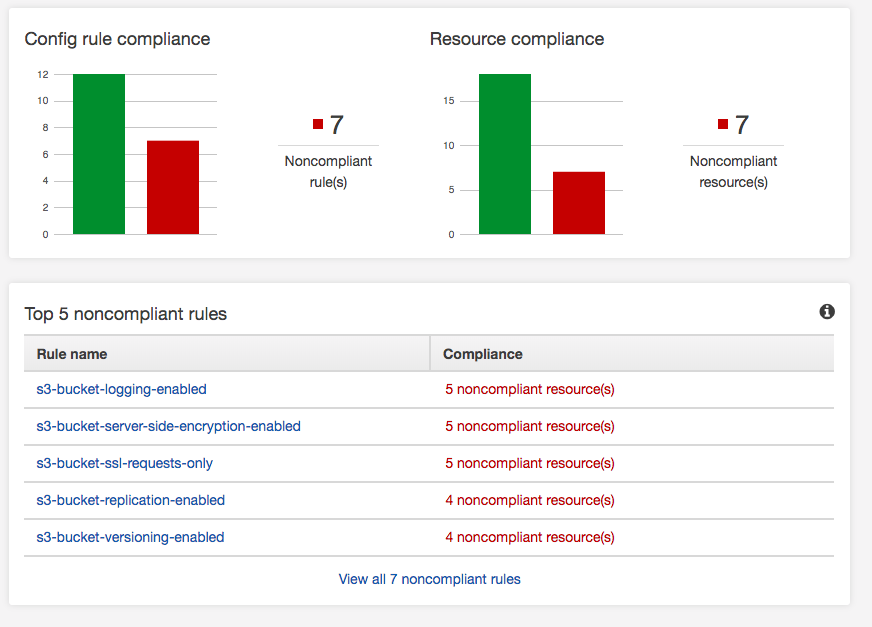
If you have an AWS deployment, make sure you turn on AWS Config.       It has a whole bunch of built-in rules, and you can add your own to validate the security of your AWS environment as it relates to AWS services.   Amazon provides good documentation, a GitHub repo,  and SumoLogic does a quick How-to turn it on.      It’s straightforward to turn on and use.   AWS provides some pre-configured rules, and that’s what this AWS environment will validate against.  There is a screenshot below of the results.   Aside from turning it on, you have to decide which rules are valid for you.   For instance, not all S3 buckets have business requirements to replicate, so I’d expect this to always be a noncompliant resource.However, one of my findings yesterday was missing EBS encrypted volumes. In order to make EBS volumes encrypted its 9 easy steps:


  1. Make a snapshot of the EBS Volumes.

  2. Copy the snapshot of the EBS Volume to a Snapshot, but select encryption.   Use the AWS KMS key you prefer or Amazon default aws/ebs.

  3. Create an AMI image from the encrypted Snapshot.

  4. Launch the AMI image from the encrypted Snapshot to create a new instance.

  5. Check the new instance is functioning correctly, and there are no issues.

  6. Update EIPs, load balancers, DNS, etc. to point to the new instance.

  7. Stop the old un-encrypted instances.

  8. Delete the un-encrypted snapshots.

  9. Terminate the old un-encrypted instances.

Remember KMS gives you 20,000 request per month for free, then the service is billable.

If you have an AWS deployment, make sure you turn on AWS Config.       It has a whole bunch of built-in rules, and you can add your own to validate the security of your AWS environment as it relates to AWS services.   Amazon provides good documentation, a

Amazon Crashing on Prime Day

Amazon is crashing on Prime Day,  made breaking news.   Appears the company is having issues with the traffic load.

Given Amazon runs from AWS as of 2011. Not a great sign for either Amazon or the scalability model they deployed on AWS.

Amazon is crashing on Prime Day,  made breaking news.   Appears the company is having issues with the traffic load.

Given Amazon runs from AWS as of 2011. Not a great sign for either Amazon or the scalability model they deployed on...