AWS has the security shared responsibility model.
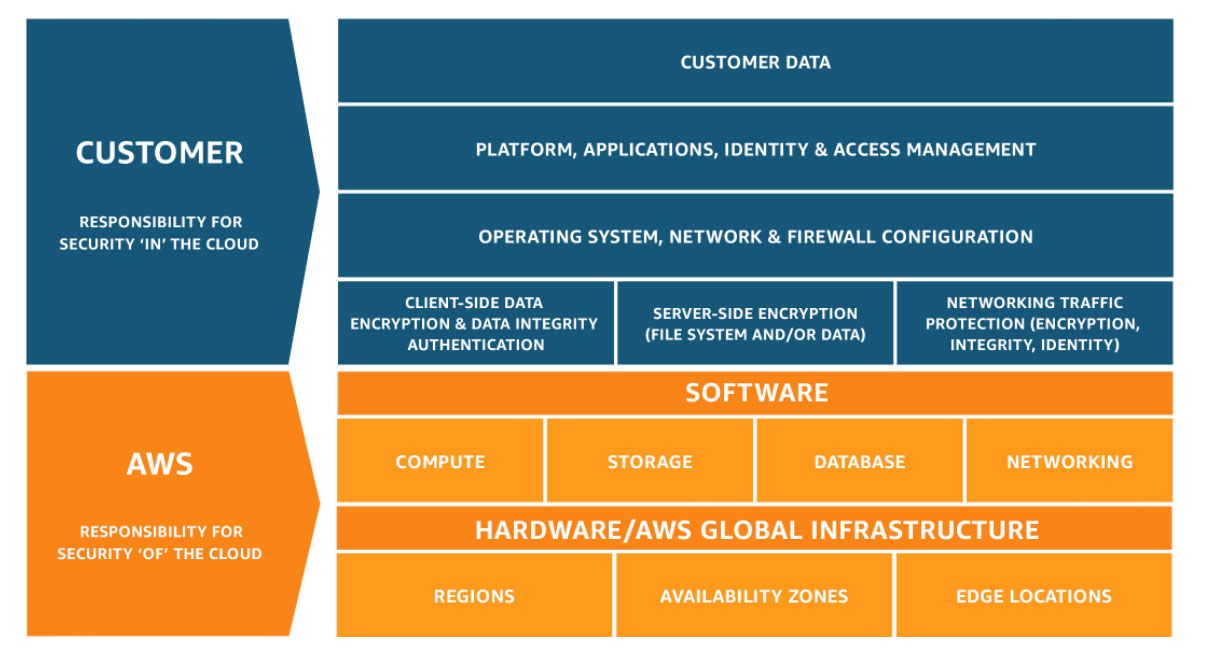
Anyone on the AWS platform understands where this model. However, security on AWS is not easy as AWS has always been a platform of innovation. AWS has released a ton of services AWS Config,
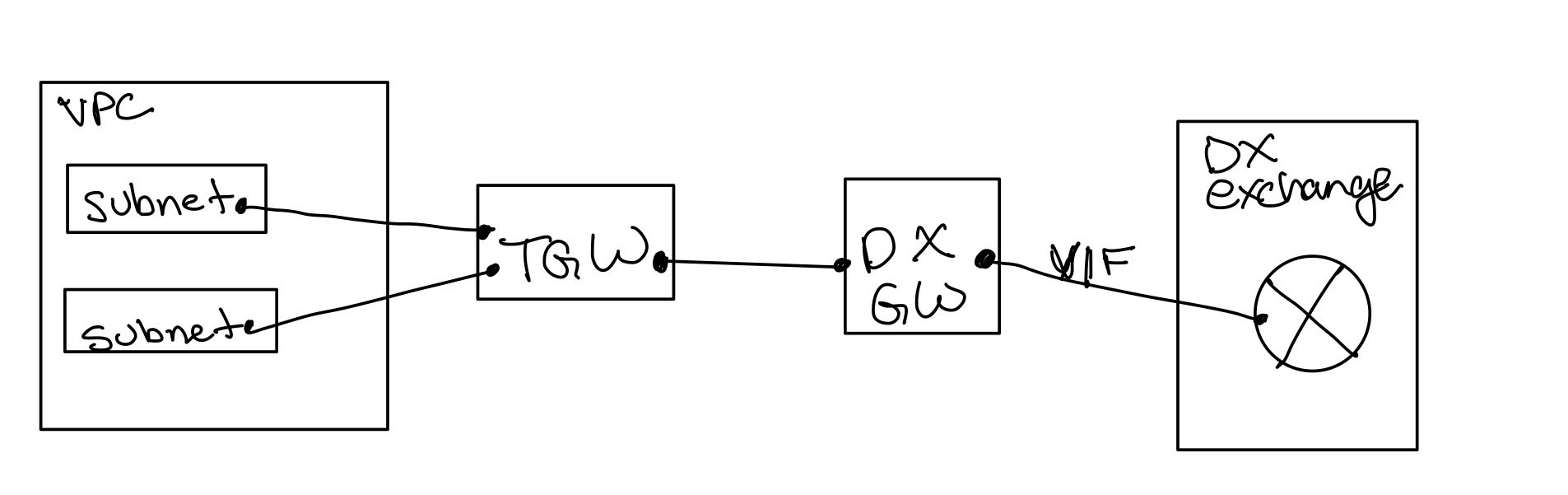
After studying for Advanced Networking Exam, I pondered a question about global backbones. There is a need for common understanding. So let’s take a step back. Transit gateway was a service introduced at ReInvent 2018. Transit Gateway(TGW) puts a router between VPCs and other networking services. The transit gateway works by putting attachments in each VPC using ENIs. If you’re lost before proceeding, watch the Re: Invent Video. TGW uses attachments is fundamental to the VPC architecture as the VPC doesn’t process traffic from a source destination outside the VPC. So the attachment ENI becomes part of the VPC. So now I have an attachment in the VPC thru a subnet. So instead of terminating my DirectConnect Gateway(DXGW) on a VGW in a VPC, it’s terminated in a TGW. A quick whiteboard of this architecture.
This becomes challenging while building a global network because European network would look like this assuming I had three pops in one Europe region:
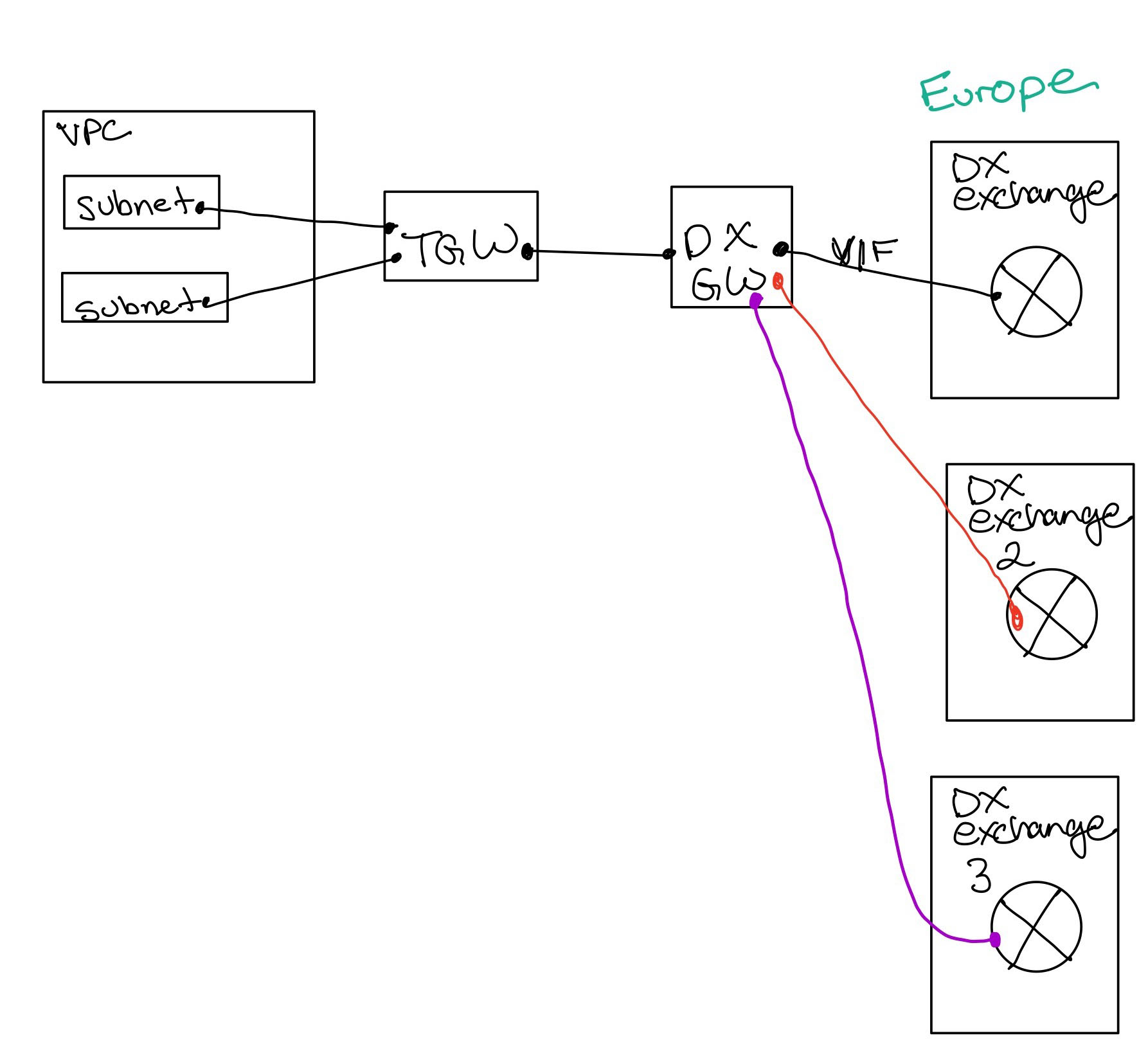
Still better than Direct Connect Gateways to the VPCs. But there is a limitation Transit Gateways which are peered, don’t dynamically pass routes. This works great if you summarize routes by region. Like the US was all 10.50.0.0/12, and Europe was all 10.100.0.0/12. What doesn’t work is when I have unsummarized routes. But I digress route summarization doesn’t matter to the question. So here is a quick view of our whiteboard architecture of Europe and US regions:
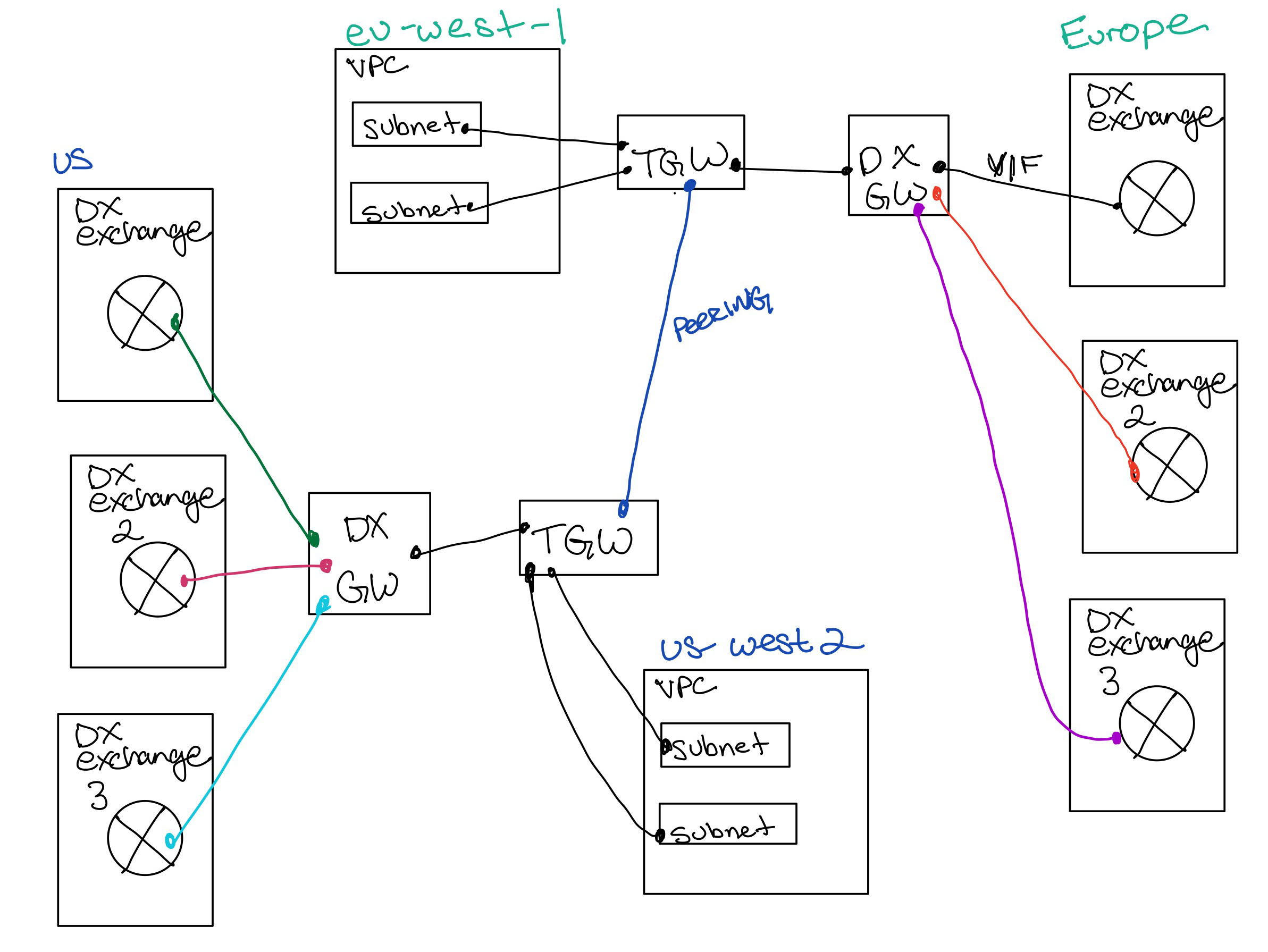
The question is if there was dynamic routing, could I use the AWS backbone to haul traffic around the world without having to build my own global network as the two TGWs would exchange my prefixes from the exchange or pop locations?
After studying for Advanced Networking Exam, I pondered a question about global backbones. There is a need for common understanding. So let’s take a step back. Transit gateway was a service introduced at ReInvent 2018. Transit Gateway(TGW) puts a router between VPCs and other networking services. The transit gateway works...
I needed to recertify the Advanced Networking specialty. Technically it expired on 6/20. So I decided to focus on the Professional as it would include Networking and Security topics. I need to recertify Security Speciality later this month.
I took the AWS Advanced Networking Speciality on Tuesday and passed.
I took this exam with Pearson VUE. The exam opens 30 minutes before to get checked out. The process with the same as PSI, only there wasn’t a long wait. Personally, the interface in PSI is a little nicer than Pearson VUE. However, the experience of the otherwise of taking the exam is the same as it’s from the comfort of home.
I’m not going to talk about the exam, as that would violate the NDA. There are three observations. First, the exam requires deep AWS networking knowledge. Make sure you get in the console and get hands-on. The exam, as advertised, requires deep understanding and experience, which can only come thru practical hands-on experience. The other observation I would make is that the exam requires knowledge of services touched by networking, which is why acloud.guru course recommends associate level certification. The last comment on this exam has the most deficient written questions and answers of the certification exams I’ve taken. The questions and answers lack clarity found on the other exams.
I took the exam in about 90 minutes, which is half the allocated time. There were enough questions that I struggled to know the correct answer. I had no sense if I had no sense during the exam of a pass or fail.
Now the parts I can talk about, which was my preparation for the exam. In studying, the number of new networking specific services, including Transit Gateway announced Re:Invent 2018, Firewall Manager introduced April 2018 to name a few. The changes in networking services like AWS Shield, VPC FLow Logs, WAF between studying back in 2018 and studying three years later is incredible. Probably the reason, these certifications have to be re-certified every three years. The first time for the exam, I put about 50 hours of preparation into studying for the exam. This time I put maybe 16 hours into studying.
I watched about 80% of the acloud.guru course. I did watch most of it in 1.75x speed. I would slow down if I didn’t understand a topic or wanted more. I also read many whitepapers and FAQs and watched Youtube videos (2x) and linked below.
Resources:
I needed to recertify the Advanced Networking specialty. Technically it expired on 6/20. So I decided to focus on the Professional as it would include Networking and Security topics. I need to recertify Security Speciality later this month.
I took the AWS Advanced Networking Speciality on Tuesday and passed.
I...
I sat the AWS Certified Solutions Architect - Professional exam last Monday. This was to recertify my expiring AWS Professional Certification, which recertified my Cloud Practioner and Associate Architect.
The exam is challenging. Probably the most time I spent taking an AWS exam, 2 hours and 21 minutes. My original certification came with what was the famous reading comprehension exam, which retired in 2019. This exam didn’t require that level of reading but was harder. Also, I finished the old exam faster than this one.
Let provide three observations on the exam that won’t violate any NDA. First, it feels more SysOps than Architect because the scenarios aren’t as drawn out in the exam, which retired in 2019. Secondly, it tests both the breadth and depth of AWS services. Lastly, back in 2018, I said, “The entire exam is a challenge to pick the more correct answer based on the scenario and question with a driving factor of one more or more of the following, scalability, cost, recovery time, performance, or security.” That statement holds true on this exam.
For preparation, I watched about 50% of the acloud.guru course. I skipped the sections thru comfortable sections. I also read a bunch of whitepapers, FAQs and watched Youtube videos and linked below.
I took the exam with PSI. First, PSI doesn’t start the check till the exam slot, which takes 20-30 minutes. Secondly, the app will suck battery power. Given the requirements, I couldn’t use my regular desk, so be prepared.
Last comment, not that the team at AWS is trying to, but the exam is about getting you stuck on a question, so you run out of time or rush thru and miss core context. I’ve been on the platform a long time and work for AWS, it took me 78% of the allocated time on a Monday night to do the exam, and I read fast. The main takeaway is to develop an exam strategy that works for you and is practiced on the associate level exams before sitting this exam.
List of resources:
I sat the AWS Certified Solutions Architect - Professional exam last Monday. This was to recertify my expiring AWS Professional Certification, which recertified my Cloud Practioner and Associate Architect.
The exam is challenging. Probably the most time I spent taking an AWS exam, 2 hours and 21 minutes. My original...
awsarch.io was switched over to Graviton2 instance types, as there was significant cost savings, something like 20% if my math was correct. There very little to this blog as it uses some Jekyll and apache. All the posts are maintained in a source code repo as they start life as markdown. Jekyll converts the markdown into HTML.
The os takes care of the differences between graviton2 arm based on the prior intel instances. The performance of t instances is not exceptional, but they scale under load like any other instance and super cost-effective.
Software required which is not available can be built using GCC. I think I had to build on a package, and it worked fine. Tools managed by homebrew had no issues.
awsarch.io was switched over to Graviton2 instance types, as there was significant cost savings, something like 20% if my math was correct. There very little to this blog as it uses some Jekyll and apache. All the posts are maintained in a source code repo as they start life...
I passed the AWS Certified Database Speciality Exam in May. That makes my 11th AWS certification. The database specialty seems to have split out the database content from the Big Data exam, which was retired in April of 2020. I did SME work on this exam and completed several workshops before its release.
Update 4/8/2021:
I reviewed the acloud.guru course and it seems to cover the exam topics covered in the exam blueprint
With the removal of the Alexa Certification, I now have all 11 AWS certifications.
I passed the AWS Certified Database Speciality Exam in May. That makes my 11th AWS certification. The database specialty seems to have split out the database content from the Big Data exam, which was retired in April of 2020. I did SME work on this exam and completed several workshops...
The Machine Learning exam is rather difficult, as discussed previously. The starting point would be the acloud.guru Machine Learning course or Linux Academy courses. Additionally is the training offered by AWS. A chunk of Machine Learning...
I passed the AWS Certified Machine Learning Speciality Exam on Monday. That makes my 10th AWS certification in the last 18 months.
The Machine Learning Specialty certification is unlike any of the other exams from AWS. The exam doesn’t just focus on AWS specifics but covers a wide range of Machine Learning topics. The exam blueprint provides a basis of this coverage.
The exam is probably the hardest of the 10 I’ve taken to date. The entire exam, I thought I know the material, but I don’t think I know it well enough to pass the exam. My score was good, and it satisfying to add this certification. For the Machine Learning exam, I put in well over 200 hours over the last six months and over 80 hours the four weeks before sitting the exam. Definitely think the Big Data Certification helped on the data preparation sections.
They’re a bunch of links I will share later this week, which I studied. In addition to all the reading, I did acloud.guru’s AWS Certified Machine Learning - Speciality, which provides 40% of the material required to pass the exam. The rest of the exam requires detailed knowledge of Machine Learning. I followed the learning track recommended by AWS for Data Scientist. I also did several sections from Linux Academy Machine Learning, including the great section explaining PCA. Lastly, I took the AWS practice exam. I did look at Whizlabs but was somewhat disappointed in their practice tests.
In 2020, I hope to get a project which will allow me to leverage Machine Learning in SageMaker to solve a complex customer problem.
I passed the AWS Certified Machine Learning Speciality Exam on Monday. That makes my 10th AWS certification in the last 18 months.
The Machine Learning Specialty certification is unlike any of the other exams from AWS. The exam doesn’t...
I’ve been on AWS since February of 2009, and my first bill was for $1.21 for some S3 Storage. Recently, I wanted to understand the Google Cloud Platform, as people talk about Spanner, BigQuery, BigTable, and App Engine. I figured the best way to learn was to challenge myself with a Google certification exam.
Given all my AWS experience, I initially wanted to write a blog article about what I liked and disliked, but I don’t think it’s that simple. There are exciting things within AWS and Google. Both of the platforms are complex, so this by no means is exhaustive. It’s more of what I noticed in my first couple of logins to Google Cloud.
The first thing I noticed was outside the service names how familiar the services were, and it didn’t take much to understand the VPCs, IAM, Billing, monitoring, Kubernetes (GKE), and Storage. The service names are vastly different, where Google calls everything Cloud blah and AWS calls them AWS or Amazon blah. Most of the fundamental principles were the same, especially in primary services like Compute, Storage, and IAM. This terminology probably speaks more to multi-cloud, than anything else.
The second thing I found that the Google Cloud Shell in the browner was outstanding. Google Cloud Shell is a container running which gives you a fully functioning Linux shell with disk space. Cloud Shell can be used for files, configuration files like Kubernetes manifests, and to check out code repositories. The kicker is that it’s embedded into the service and is free. The closest thing AWS offers is the shell inside Cloud9 service, which comes with an added expense. The Cloud Shell is something I liked on GCP.
The third thing I noticed was this concept of projects, which is a folder construct. I’m not sure if I like it. I saw examples where people used seperate folders for dev, test, and Production in the same account. I would be a little concerned given how easy it would be to be in the wrong project and issue commands. I prefer my dev/test to be separate accounts from Production. So I don’t necessarily know if this is a good or bad thing, but trends toward dislike.
Next fourth thing I noticed was the firewall rules. AWS has both the concept of Security Groups and Firewalls (NACLS). GCP only has firewall rules. The rule structure is impressive, as it allows to target by service account, tags, IP addresses. I would have a concern in a larger environment that the Firewall Rule list would be overly complicated and difficult to read and manage. I much prefer smaller nested security groups on AWS. However, the flexible of the GCP Firewall is impressive. I want the concept of tags inside security groups within AWS. So firewall rules are something I liked.
The fifth thing I want to highlight is the instance configuration. While AWS offers fixed CPU and memory instances, GCP offers custom selections for memory and CPU. This could be very interesting if there are a low CPU and high memory workload. I didn’t see significant cost differences between an overprovisioned AWS resource vs. a custom GCP resource. However, I also didn’t do an in-depth, TCO analysis. Again, I see pros and cons to this and probably I am neutral on this subject.
The last thing is the UI. It is different from AWS, and it took some use getting used too. It’s very similar in my experience to the G-Suite Admin or other Google services. I found the configuration of computing to be more changing given it’s a single page with tabs, vs. the AWS workflow. However, other items like Storage seemed to be more friendly. It doesn’t make a lousy user experience. Again I am neutral on this topic, I learned how to use it.
Probably now you are reading this and looking for that summary or in conclusion section. I’m not going to provide it. I remember two decades ago when we wanted to stand up web servers in a data center for a project, and it was going to cost $5,000 before we wrote the first line of code. As struggling college students, this wasn’t going to happen. What I am going to say is to go build something. Its never been easier for a builder to make an idea come to life on a platform you prefer with minimum investment (free tier). If your game is running Cobol inside a Kubernetes container, go do it. If you hate infrastructure go Serverless. Cobol on serverless would me attractive, eh? The power is in your hands. If you don’t have any ideas, go get a cloud certification. There never been a better time for a technologist with cloud experience.
I’ve been on AWS since February of 2009, and my first bill was for $1.21 for some S3 Storage. Recently, I wanted to understand the Google Cloud Platform, as people talk about Spanner, BigQuery, BigTable, and App Engine. I figured the best way to learn was to challenge myself with...
I passed the AWS Certified Big Data Speciality Exam on Saturday. That makes my 9th AWS certification in the last 10 months. For a moment I’ll have 9/9 certifications. Machine Learning opens this month, so come tomorrow I’ll have 9/10 Certifications. Machine learning recommended training is Big Data on AWS and Deep Learning on AWS. Given I just completed Big Data, probably schedule this exam for sometime in May.
Big Data Certification Exam is similar to the other specialty exams. While not necessarily as hard as the Professional level exams it does require a detailed level of knowledge. Also unlike the other specialty exams, Big Data requires a breadth and depth of knowledge consistent with the Professional Level exams. I prepared using acloud.guru’s AWS Certified Big Data - Speciality which provides somewhere between 50% - 60% of the required topics around Kinesis, IoT, S3, DynamoDB, EMR, Redshift, and Quicksight. I did review some topics in Linux Academy to reinforce the concepts. The rest of the experience is hands-on or lab learnings. AWS doesn’t offer a practice exam, so I tried the Whizlab practice exams. Whizlab’s typically have issues and provide a false level of confidence as the practice exams are always easier than the actual certification exam.
Acloud.guru covers much information, and it also provides a set of links to critical whitepapers and blog articles. As always without, violating the NDA, they do an excellent job in pointing you to the topics to study. Aside from that material, I read a whole bunch of AWS links, which will be posted at the end of this blog article. Also, there was a great youtube playlist John Creecy put together at https://www.youtube.com/playlist?list=PLlp-qT09uTBcoMpiQkpO-G8GsHOVWyfV0.
I am relatively little experience with Kinesis, EMR, Redshift, and Quicksight, before studying for the exam. I found Kinesis, Redshift, and Elasticsearch fascinating, and will be looking for projects in this space to continue my learning.
Kinesis
https://docs.aws.amazon.com/streams/latest/dev/key-concepts.html
https://docs.aws.amazon.com/streams/latest/dev/introduction-to-enhanced-consumers.html
https://docs.aws.amazon.com/streams/latest/dev/kinesis-record-processor-ddb.html
https://docs.aws.amazon.com/streams/latest/dev/kinesis-using-sdk-java-resharding-split.html
https://docs.aws.amazon.com/streams/latest/dev/developing-producers-with-kpl.html
https://docs.aws.amazon.com/streams/latest/dev/building-consumers.html
https://docs.aws.amazon.com/streams/latest/dev/creating-using-sse-master-keys.html
https://docs.aws.amazon.com/streams/latest/dev/kinesis-kpl-concepts.html
https://docs.aws.amazon.com/streams/latest/dev/kinesis-producer-adv-retries-rate-limiting.html
https://docs.aws.amazon.com/streams/latest/dev/service-sizes-and-limits.html
https://docs.aws.amazon.com/streams/latest/dev/monitoring-with-kcl.html
https://docs.aws.amazon.com/streams/latest/dev/agent-health.html
https://docs.aws.amazon.com/streams/latest/dev/kinesis-using-sdk-java-resharding-merge.html
Kinesis Firehose
https://docs.aws.amazon.com/firehose/latest/dev/what-is-this-service.html#data-flow-diagrams
https://docs.aws.amazon.com/firehose/latest/dev/data-transformation.html
https://docs.aws.amazon.com/firehose/latest/dev/create-configure.html
https://docs.aws.amazon.com/firehose/latest/dev/record-format-conversion.html
https://docs.aws.amazon.com/firehose/latest/dev/data-transformation.html#lambda-blueprints
https://docs.aws.amazon.com/firehose/latest/dev/encryption.html
Kinesis Data Analytics
https://docs.aws.amazon.com/kinesisanalytics/latest/dev/what-is.html
https://docs.aws.amazon.com/kinesisanalytics/latest/dev/streams-pumps.html
https://docs.aws.amazon.com/kinesisanalytics/latest/dev/authentication-and-access-control.html
https://docs.aws.amazon.com/kinesisanalytics/latest/dev/stagger-window-concepts.html
https://docs.aws.amazon.com/kinesisanalytics/latest/dev/tumbling-window-concepts.html
https://docs.aws.amazon.com/kinesisanalytics/latest/dev/sliding-window-concepts.html
https://docs.aws.amazon.com/kinesisanalytics/latest/dev/continuous-queries-concepts.html
IoT
https://docs.aws.amazon.com/iot/latest/developerguide/what-is-aws-iot.html
https://docs.aws.amazon.com/iot/latest/developerguide/policy-actions.html
https://docs.aws.amazon.com/iot/latest/developerguide/iam-policies.html
https://docs.aws.amazon.com/iot/latest/developerguide/iot-provision.html
https://docs.aws.amazon.com/iot/latest/developerguide/iot-device-shadows.html
https://docs.aws.amazon.com/iot/latest/developerguide/iot-rule-actions.html
ElasticSearch
https://docs.aws.amazon.com/elasticsearch-service/latest/developerguide/what-is-amazon-elasticsearch-service.html
https://docs.aws.amazon.com/elasticsearch-service/latest/developerguide/aes-bp.html
https://docs.aws.amazon.com/elasticsearch-service/latest/developerguide/es-aws-integrations.html
CloudSearch
https://docs.aws.amazon.com/cloudsearch/latest/developerguide/what-is-cloudsearch.html
EMR
https://docs.aws.amazon.com/emr/latest/ManagementGuide/emr-overview.html#emr-overview-clusters
https://docs.aws.amazon.com/emr/latest/ManagementGuide/emr-plan-file-systems.html
https://docs.aws.amazon.com/emr/latest/ManagementGuide/emr-plan-consistent-view.html
https://docs.aws.amazon.com/emr/latest/ManagementGuide/emr-encryption-enable.html#emr-awskms-keys
https://docs.aws.amazon.com/emr/latest/ManagementGuide/emr-data-encryption-options.html
https://docs.aws.amazon.com/emr/latest/ManagementGuide/emrfs-configure-sqs-cw.html
https://docs.aws.amazon.com/emr/latest/ReleaseGuide/emr-hive.html
https://docs.aws.amazon.com/emr/latest/ReleaseGuide/emr-flink.html
https://docs.aws.amazon.com/emr/latest/ReleaseGuide/emr-tez.html
https://docs.aws.amazon.com/emr/latest/ReleaseGuide/emr-hbase.html
https://docs.aws.amazon.com/emr/latest/ReleaseGuide/emr-hcatalog.html
https://docs.aws.amazon.com/emr/latest/ReleaseGuide/emr-zookeeper.html
https://docs.aws.amazon.com/emr/latest/ReleaseGuide/emr-phoenix.html
https://docs.aws.amazon.com/emr/latest/ReleaseGuide/emr-sqoop.html
https://docs.aws.amazon.com/emr/latest/ReleaseGuide/emr-presto.html
https://docs.aws.amazon.com/emr/latest/ReleaseGuide/emr-jupyter-emr-managed-notebooks.html
https://docs.aws.amazon.com/emr/latest/ReleaseGuide/emr-jupyterhub.html
QuickSight
https://docs.aws.amazon.com/quicksight/latest/user/welcome.html
https://docs.aws.amazon.com/quicksight/latest/user/refreshing-imported-data.html
https://docs.aws.amazon.com/quicksight/latest/user/joining-tables.html
https://docs.aws.amazon.com/quicksight/latest/user/bar-charts.html
https://docs.aws.amazon.com/quicksight/latest/user/combo-charts.html
https://docs.aws.amazon.com/quicksight/latest/user/heat-map.html
https://docs.aws.amazon.com/quicksight/latest/user/line-charts.html
https://docs.aws.amazon.com/quicksight/latest/user/kpi.html
https://docs.aws.amazon.com/quicksight/latest/user/restrict-access-to-a-data-set-using-row-level-security.html#create-row-level-security
https://docs.aws.amazon.com/quicksight/latest/user/tabular.html
https://docs.aws.amazon.com/quicksight/latest/user/supported-data-sources.html
https://docs.aws.amazon.com/quicksight/latest/user/scatter-plot.html
https://docs.aws.amazon.com/quicksight/latest/user/geospatial-data-prep.html
Redshift
https://docs.aws.amazon.com/redshift/latest/dg/tutorial-tuning-tables-distribution.html
https://docs.aws.amazon.com/redshift/latest/dg/c_best-practices-best-dist-key.html
https://docs.aws.amazon.com/redshift/latest/mgmt/working-with-clusters.html#rs-about-clusters-and-nodes
https://docs.aws.amazon.com/redshift/latest/mgmt/enhanced-vpc-working-with-endpoints.html
https://docs.aws.amazon.com/redshift/latest/dg/c_designing-queries-best-practices.html
https://docs.aws.amazon.com/redshift/latest/dg/c_best-practices-use-copy.html
https://docs.aws.amazon.com/redshift/latest/dg/c_intro_STL_tables.html
https://docs.aws.amazon.com/redshift/latest/dg/c_intro_STV_tables.html
https://docs.aws.amazon.com/redshift/latest/dg/cm-c-implementing-workload-management.html
https://docs.aws.amazon.com/redshift/latest/dg/wlm-short-query-acceleration.html
DynamoDB
https://docs.aws.amazon.com/amazondynamodb/latest/developerguide/bp-partition-key-design.html#bp-partition-key-partitions-adaptive
https://docs.aws.amazon.com/amazondynamodb/latest/developerguide/globaltables_monitoring.html
https://docs.aws.amazon.com/amazondynamodb/latest/developerguide/bp-partition-key-data-upload.html
https://docs.aws.amazon.com/amazondynamodb/latest/developerguide/globaltables_reqs_bestpractices.html
https://docs.aws.amazon.com/amazondynamodb/latest/developerguide/bp-gsi-aggregation.html
https://docs.aws.amazon.com/amazondynamodb/latest/developerguide/bp-gsi-overloading.html
https://docs.aws.amazon.com/amazondynamodb/latest/developerguide/bp-indexes-gsi-sharding.html
Machine Learning
https://docs.aws.amazon.com/machine-learning/latest/dg/types-of-ml-models.html
https://docs.aws.amazon.com/machine-learning/latest/dg/binary-model-insights.html
https://docs.aws.amazon.com/machine-learning/latest/dg/regression-model-insights.html
https://docs.aws.amazon.com/machine-learning/latest/dg/multiclass-model-insights.html
https://docs.aws.amazon.com/machine-learning/latest/dg/ml-model-insights.html
https://docs.aws.amazon.com/machine-learning/latest/dg/cross-validation.html
https://docs.aws.amazon.com/machine-learning/latest/dg/creating-and-using-datasources.html
https://docs.aws.amazon.com/machine-learning/latest/dg/creating-a-data-schema-for-amazon-ml.html
https://docs.aws.amazon.com/machine-learning/latest/dg/amazon-machine-learning-key-concepts.html
Pipeline
https://docs.aws.amazon.com/datapipeline/latest/DeveloperGuide/dp-how-tasks-scheduled.html
https://docs.aws.amazon.com/datapipeline/latest/DeveloperGuide/dp-concepts-datanodes.html
https://docs.aws.amazon.com/datapipeline/latest/DeveloperGuide/dp-concepts-databases.html
https://docs.aws.amazon.com/datapipeline/latest/DeveloperGuide/dp-importexport-ddb-part1.html
https://docs.aws.amazon.com/datapipeline/latest/DeveloperGuide/datapipeline-related-services.html
Data Movement
https://docs.aws.amazon.com/SchemaConversionTool/latest/userguide/CHAP_Welcome.html
Athena
https://docs.aws.amazon.com/athena/latest/ug/access.html
https://docs.aws.amazon.com/athena/latest/ug/encryption.html#encryption-options-S3-and-Athena
https://docs.aws.amazon.com/athena/latest/ug/athena-aws-service-integrations.html
Glue
https://docs.aws.amazon.com/glue/latest/dg/components-overview.html
I passed the AWS Certified Big Data Speciality Exam on Saturday. That makes my 9th AWS certification in the last 10 months. For a moment I’ll have 9/9 certifications. Machine Learning opens this month, so come tomorrow I’ll have 9/10...
I took Advanced Architecting on AWS for the last three days. The course is part of the learning process for the AWS Certified Solutions Architect – Professional. I already have the certification based on the older version of the exam. The new version of the certification exam went live on February 4th. The course seems to follow the newer certification guide. Overall the course is good as it covers all the services required, the labs were a little disappointing as they lacked complexity. To become proficient and attempt the certification, one would need to a lot more learning and deep diving on the topics covered in this course. It reviews probably 35% of the material required to sit the exam.
Here is my summary by day of the course.
Day One
The morning was spent covering Account Management and multiple accounts, leading to AWS Organizations with service control policies. It finished on billing. The next two discussions where around Advanced Networking Architectures, then VPN and DirectConnect. The afternoon finished with a discussion on Deployments on AWS which was an abbreviation of material covered in the DevOps Course.
Day Two
The morning started with data specifically discussing S3 and Elasticache. Next, it was all about data import into AWS with Snowball, Snowmobile, S3 Transfer Acceleration, Storage Gateways(Tape Gateway, Volume Gateway, and File Gateway), and fished with Data Sync, and Database Migration,
The afternoon was spent on Big Data Architecture and Designing Large Scale Applications and finished with a lab on Blue-Green Deployments on Elastic BeanStalk.
Day Three
The last day was spent on Building Resilient Architectures, and encryption and Data Security. The day ended early with a Lab on KMS. The lab provided some basic KMS and OpenSSL encryption steps.
I thought the course, missed an opportunity to talk about DR architectures.
It’s an interesting course and worth taking if you’re interested in learning more or planning to take the certifications.
I took Advanced Architecting on AWS for the last three days. The course is part of the learning process for the AWS Certified Solutions Architect – Professional. I already have the certification based on the older version of the exam. The new version of the certification exam went...
One of the more interesting AWS Big Data Services is Amazon Athena. Athena can process S3 data in a few seconds. One of the ways I like using it is to look for patterns in ALB access logs.
AWS provides a detailed instruction on how to setup Athena on how to setup ALB access logs. I’m not going to recap the configuration in this blog article, but share 3 of my favorite queries.
What is the most visited page by the client and total traffic on my website:
SELECT sum(received_bytes) as total_received, sum(sent_bytes) as total_sent, client_ip,
count(client_ip) as client_requests, request_url
FROM alb_logs
GROUP BY client_ip, request_url
ORDER BY total_sent  desc;
How long does it take to process requests on average?
SELECT sum(request_processing_time) as request_pt, sum(target_processing_time) as target_pt,
sum (response_processing_time) respone_pt,
sum(request_processing_time + target_processing_time + response_processing_time) as total_pt,
count(request_processing_time) as total_requests,
sum(request_processing_time + target_processing_time + response_processing_time) / count(request_processing_time) as avg_pt,
request_url, target_ip
FROM alb_logs WHERE target_ip <> ''
GROUP BY request_url, target_ip
HAVING COUNT (request_processing_time) > 4
ORDER BY avg_pt desc;
This last one is looking for requests the site doesn’t process. It’s usually some person trying to find some vulnerable PHP code.
SELECT count(client_ip) as client_requests, client_ip, target_ip, request_url,
target_status_code
FROM alb_logs
WHERE target_status_code not in ('200','301','302','304')
GROUP BY client_ip, target_ip, request_url, target_status_code
ORDER BY client_requests desc;
Athena is a serverless tool, and it sets up in seconds and the charges based on TB scanned with a 10MB minimum for the query.
One of the more interesting AWS Big Data Services is Amazon Athena. Athena can process S3 data in a few seconds. One of the ways I like using it is to look for patterns in ALB access logs.
AWS provides a detailed instruction on how to setup Athena on...
I took DevOps Engineering on AWS for the last three days. The course is part of the learning process for the AWS Certified DevOps Engineer – Professional Overall the course is excellent it covers substantial material, and the labs are ok. To become proficient, one should do the labs from scratch and build the CloudFormation templates. It reviews 45-50% of the material for the on the DevOps Exam, so each topic requires a deeper dive before sitting the exam.
Here is my summary by day of the course.
Day One
The class started with an introduction to DevOps and the AWS tools which support Devops:
It’s interesting as CodeBuild, CodeDeploy, and CodePipeline are required to replace Jenkins. Their advantage is that it directly integrate with AWS. One question I have is why isn’t there a service like Jfrog Artifactory
One of my favorite topics was DevSecOps which talks about adding security into the DevOps process. There should be a separate certification and course for DevSecOps or SecDevOps.
There was a minimum discussion on Elastic Beanstalk, which was a big part of the old acloud.guru course and had several questions on the old exam.
Lastly, the day focused on various methods for updating applications.
In-place updates
Rolling updates
Blue/Green Deployments
Red/Black Deployments
Day Two
The class started with a lab on CloudFormation. The lab was flawed as it had a code deployment via the cfn-init and cfn-hup. The rest of the morning was a deeper dive on the tools discussed throughout Day 1.
Afternoon lab focused on a pipeline, CodeBuild, and CodeDeploy. After the lab, we spent time discussing various testing, CloudWatch Logs, and Opsworks. Most of the discussion was theoretical.
Day Three
The first part of the morning was a 2-hour lab on AWS Opsworks setting up a Chef recipe and scaling out the environment. The rest of the class was devoted to containers, primary ECS, with a lab that deployed an application on containers.
It’s an interesting course and worth taking if you’re doing AWS DevOps or planning to take the certifications.
I took DevOps Engineering on AWS for the last three days. The course is part of the learning process for the AWS Certified DevOps Engineer – Professional Overall the course is excellent it covers substantial material, and the labs are ok. To become proficient, one should do the...
Passed the AWS Cloud Partitioner Certification Exam. Given I have 7 of the 9 certifications before sitting this exam, I didn’t study. The goal before taking the exam was 100% in 20 minutes. I missed 3 questions and took 16 minutes. I took the exam at some point I am going to complete the Big Data Speciality, which will give me all the AWS certifications for a brief moment. The Machine Learning AI beta completed last month and the Alexa Skill Builder just completed its beta. This means by March there could be 10 or 11 AWS Certifications.
Passed the AWS Cloud Partitioner Certification Exam. Given I have 7 of the 9 certifications before sitting this exam, I didn’t study. The goal before taking the exam was 100% in 20 minutes. I missed 3 questions and took 16 minutes. I took the exam at some point I...
I posted to Github a list of links I found valuble when studying for the AWS DevOps Pro certification exam.
The original blog article about passing the test can be found here AWS Certified DevOps Engineer - Professional
I posted to Github a list of links I found valuble when studying for the AWS DevOps Pro certification exam.
The original blog article about passing the test can be found here AWS Certified DevOps Engineer - Professional
AWS Certification SME program helps AWS Certification team, develop the certification exams. It’s a complicated process which as many steps, but I won’t get into now. However, I have now done two workshops on two different steps, one an item writing workshop back in November and now a Standard setting workshop.
The most interesting aspect is fellow partitioners create the exams with certifications, there are people to facilitate, validate and review the information.
The questions are designed to have you apply AWS experience and knowledge of situations. Someone asked if labs would be a replacement, maybe running thru a hundred labs would be the equivalent of real-world experience.
Doing the course, reading all the FAQs and whitepapers and watching all the 400 reinvent videos would be the minimum.
AWS Certification SME program helps AWS Certification team, develop the certification exams. It’s a complicated process which as many steps, but I won’t get into now. However, I have now done two workshops on two different steps, one an item writing workshop back in November and now a Standard...
Today I officially started with Amazon Web Services as a Senior Cloud Architect. The position is with Professional Services working with Strategic Accounts.
I am looking forward to helping AWS customers continue to build on their cloud journey.
Today I officially started with Amazon Web Services as a Senior Cloud Architect. The position is with Professional Services working with Strategic Accounts.
I am looking forward to helping AWS customers continue to build on their cloud journey.
Every year 10s of thousands of AWS customers and prospect customers desend on Las Vegas. For those of us to don’t make the trek Amazon live streams the the daily Key Notes. Those are where AWS announces it’s newest products and changes. Each year I build a list before November as AWS has a tendency to leak smaller items. This year my wish list for AWS was as follows:
- Mixing sizes and types in ASG - Announced
- DNS fixed for Collapsed AD - Announced
- Cross regional replication for Aurora PostGreSQL - Regions expanded still waiting on the cross regions to be announced
- Lambda and more Lambda integrations - Announced
- AWS Config adding machine learning based on account.
- Account level S3 bucket control - Partly Announced
- 40Gbps Direct Connect
There a lot of announcements, far too many to recap if interested in them all go read the AWS News Blog. I do like to find two announcements which shock me and two things that seem interesting.
The two items which shocked me were:
- DynamoDB added transactional support (ACID). This means someone could build an e-commerce or banking application which requires consistent transactions on dynamoDB.
- AWS Outposts and AWS RDS on VMware allows you to deploy AWS on-premise and AWS will manage this for you. I can only assume this is to help with migrations or workloads so sensitive they can’t move off-premise. It would be interesting to see how AWS manages storage capacity and compute resources as many companies struggle with these and how the management model will work. However, given the push to move away from traditional data centers, so reserves that course. It will be interesting to see how it plays out over the next year and what services this provides a company migrating to the cloud.
On my passions is security, so the two things which interested me are
- AWS Security Hub and AWS Control Tower - I consider these one thing as they will be used in tandem. Control Center will provide security launch zone for an organization while AWS Security Hub will provide governance and monitoring of security
- The ARM processor in the a1 instances which Amazon developed internally. Based on pricing these instances seem to offer cost advantages to the existing instance types.
What did you find interesting, amusing or shocking? What were you looking for which wasn’t announced?
Every year 10s of thousands of AWS customers and prospect customers desend on Las Vegas. For those of us to don’t make the trek Amazon live streams the the daily Key Notes. Those are where AWS announces it’s newest products and changes. Each year I build a list before November...
Sat the AWS Certified DevOps Engineer - Professional Exam last this afternoon. The exam is hard, as it scenario based. Most of the exam questions were to pick the best solution for deployments which comprised CloudFormation, Elastic Beanstalk and OpsWorks. Every one of those questions had 2 good answers, it came down to which was more correct based on the keywords cost, speed, redundancy, roll back capabilities.
I did the course on acloud.guru and a lot of AWS pages. At some point I will make a page of all the links I collected when studying for this exam.
The exam took me about two-thirds of the allowed time, I read fast and have a tendency to flag questions I don’t know the answer to and come back later and work thru them. This exam, I flagged 20 questions. Most of them I could figure out, once I thought about them for a while. But flagging questions and going back helps manage the time.
Upon submission, I got the “Congratulations! You have successfully completed the AWS Certified DevOps Engineer - Professional…”
I got my score email very quickly:
Overall Score: 82%
Topic Level Scoring:
| 1.0 |
Continuous Delivery and Process Automation: |
79% |
| 2.0 |
Monitoring, Metrics, and Logging: |
87% |
| 3.0 |
Security, Governance, and Validation: |
75% |
| 4.0 |
High Availability and Elasticity: |
91% |
That now makes my 7th AWS Certification.
Sat the AWS Certified DevOps Engineer - Professional Exam last this afternoon. The exam is hard, as it scenario based. Most of the exam questions were to pick the best solution for deployments which comprised CloudFormation, Elastic Beanstalk and OpsWorks. Every one of those questions had 2...
I was listening to the Architech podcast. There was a question asked, ”Does everything today tie back to Kubernetes?” The more general version of the question is, “Does everything today tie back to containers?”. The answer is quickly becoming yes. Something Google figured out years ago with its environment that everything was containerized is becoming mainstream.
To support this Amazon now has 3 different Container technologies and one in the works.
ECS which is Amazon’s first container offering. ECS is container orchestration which supports Docker containers.
Fairgate ECS which is managed offering of ECS where all you do is deploy Docker images and AWS owns full management. More exciting is that Fairgate for EKS has been announced and pending release. This will be a fully managed Kubernetes.
EKS is the latest offering which was GA’d in June. This is a fully managed control plane for Kubernetes. The worker nodes are EC2 instances you manage, which can run an Amazon Linux AMI or one you create.
Lately, I’ve been exploring EKS so that will be the next blog article, how to get started on EKS.
In the meantime, what have you containerized today?
I was listening to the Architech podcast. There was a question asked, ”Does everything today tie back to Kubernetes?” The more general version of the question is, “Does everything today tie back to containers?”. The answer is quickly becoming yes. Something Google figured out years ago with its...
Amazon recently released a presentation on Data-safe Cloud. It appears to be based on some Gartner question and other data AWS collected. The presentation discusses 6 core benefits of a secure cloud.
- Inherit Strong Security and Compliance Controls
- Scale with Enhanced Visibility and Control
- Protect Your Privacy and Data
- Find Trusted Security Partners and Solutions
- Use Automation to Improve Security and Save Time
- Continually Improve with Security Features.
I find this marketing material to be confusing at best, let’s analyze what it is saying.
For point 1, Inherit Strong and Compliance Controls, which reference all the compliance AWS achieves. However, it loses track of the shared responsibility model and doesn’t even mention until page 16. Amazon has compliance in place which is exceptional, and most data center operators or SaaS providers struggle to achieve. This does not mean my data or services running within the Amazon environment meet those compliances
For point 2, 4 and 6 those are not benefits of the secure cloud. Those might be high-level objects one uses to form a strategy on how to get to a secure cloud.
Point 3 I don’t even understand, the protection of privacy and data has to be the number one concern when building out workloads in the cloud or private data centers. It’s not a benefit of the secure cloud, but a requirement.
For point 5, I am a big fan of automation and automating everything. Again this is not a benefit of a secure cloud, but how to have a repeatable, secure process wrapped in automation which leads to a secure cloud.
Given the discussions around cloud and security given all the negative press, including the recent AWS S3 Godaddy Bucket exposure, Amazon should be publishing better content to help move forward the security discussion.
Amazon recently released a presentation on Data-safe Cloud. It appears to be based on some Gartner question and other data AWS collected. The presentation discusses 6 core benefits of a secure cloud.
- Inherit Strong Security and Compliance Controls
- Scale with Enhanced Visibility and Control
- Protect Your Privacy and Data
...
Earlier today AWS released t3 instances. There are a bunch of press releases about the topic. The performance is supposed to be 30% better than T2. Hopefully, in the next few days, independently published benchmarks will be released to confirm if the instances are 30% faster. In the interim go to the Amazon pages for all the details on T3 instances. The cost is a few cents less. For example, a reserved instance from T2.small to T3.small with no upfront went from .17 cents to .15 cents in the US-WEST-2 region.
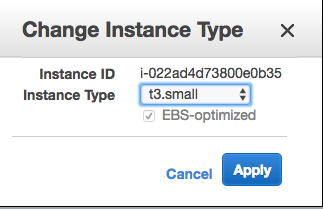
Before today awsarch.io ran off T2 instances, to build this blog article it was updated to T3 instances. AWS makes it easy to change instance type, just shut down the instance and from the AWS console go to Instance Settings->Change Instance type. Then select the appropriate t3 instance. It can be done via the AWS CLI as well.
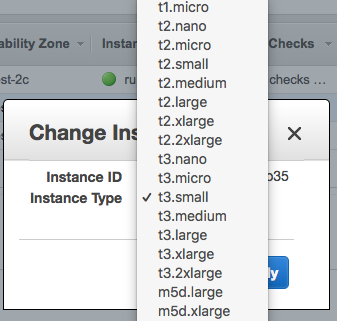 Change Instance
T3 force you to select EBS optimized volumes. EBS optimized volumes for T3 provide additional IOPS. Here is the link for the complete EBS optimized information.
 T3 EBS Optimized
The T3 instance uses an ENA adapter so before starting your instance change the ENA adapter thru the AWS command line:
aws ec2 modify-instance-attribute –instance-id --ena-support
Lastly, I notice mount points changed. Previously the EBS volumes devices in the Linux /dev directory changes. Before the change to T3 they were /dev/xvdf1, /dev/xvdf2, etc. Now the devices are /dev/nvme1n1p1, /dev/nvme1n1p2, etc. Something to keep in mind if you have additional volumes with mount points on the ec2 instance.
Earlier today AWS released t3 instances. There are a bunch of press releases about the topic. The performance is supposed to be 30% better than T2. Hopefully, in the next few days, independently published benchmarks will be released to confirm if the instances are 30% faster. In the interim go...
Amazon generates a lot of logs via VPC Flow Logs, CloudTrail, S3 access logs, CloudWatch (See the end of the blog article for a full list.) Additionally, there are OS, Application, web server logs. That is a lot of data which provides valuable insight into your running AWS environment. What are you doing to manage this log files? What are you doing with those log files? What are you doing to analysis these log files?
There are a lot of logging solutions available that integrate with AWS. Honestly, I’m a big fan of Splunk and have set it up multiple times. However, I wanted to look at something else for this blog article. Something open source and relatively low cost. This blog is going to explain what I did to setup Graylog. Graylog has no charges for the software, but you’re going to get charged for the instance, Kinesis, SQS, and data storage. It actually a good exercise if to familiarize yourself with AWS services, especially for the Sysops exams.
Graylog provides great instructions. I followed the steps remember to use their image which is already self-built on Ubuntu. One difference with this setup, I didn’t use a 4GB memory systems. I picked a t2.small which proves 1vCPU and 2GB of memory. I didn’t notice performance issues. Remember to allow ports 443 and 9000 in security groups and the Networking ACLs. I prefer to run this over HTTPS. And it bugs me when you see NOT SECURE HTTP: I installed an SSL certificate, and this is how I did it.
- Create a DNS name
- Get a free certificate
- Install the Certificate as such
Now my instance is up, and I can log into the console. I want to get my AWS logs into Graylog. To do this is requires the logs sent to Kinesis or SQS. I am not going to explain the SQS setup as there plenty of resources for the specific AWS Service. Also, the Graylog Plugin describes how to do this. Graylog plugin for CloudTrail, CloudWatch and VPC Flow logs is available on Github at Graylog Plugin for AWS.
What about access_logs? Graylog has the Graylog Collector Sidecar. I’m not going to rehash the installation instructions here as there are great installation instructions. Graylog has a great documentation. Also if you are looking for something not covered here, it will be in the documentation or in their Github project.
What are you using as your log collection processing service on Amazon?
List of AWS Servers generating logs:
Amazon S3 Access logs Amazon CloudFront Access logs Elastic Load Balancer (ELB) logs Amazon Relational Database Service (RDS) logs Amazon Elastic MapReduce (EMR) logs Amazon Redshift logs AWS Elastic Beanstalk logs AWS OpsWorks logs (or this link) AWS Import/Export logs AWS Data Pipeline logs AWS CloudTrail logs
Amazon generates a lot of logs via VPC Flow Logs, CloudTrail, S3 access logs, CloudWatch (See the end of the blog article for a full list.) Additionally, there are OS, Application, web server logs. That is a lot of data which provides valuable insight into your running AWS...
All three code platforms AWS, Google Cloud, Azure release features all the time. However, Google Cloud took a major leap by providing great tool developers by integrating with IntelliJ. Google did a great job covering the how it works in there Platform blog which is worth reading.
I have used Eclipse since it was released, prior to that I would use Emacs. However, for my master program over the last 3 years, I have been using IntelliJ. It’s become my go-to platform for coding work because IntelliJ is easy to use, and my various class groups typically use it. IntelliJ makes it free for students, which is a great way to develop a user base given its price tag.
Providing an easy to use a tool, which has an existing user based was smart by Google Cloud especially as it continues its to close the gap with AWS.
Finally, I’m not a big fan of Cloud9 on AWS. What do you think? Are you an IntelliJ or Cloud9 user?
All three code platforms AWS, Google Cloud, Azure release features all the time. However, Google Cloud took a major leap by providing great tool developers by integrating with IntelliJ. Google did a great job covering the how it works in there Platform blog which is worth reading.
...
DDoS attacks are too frequent on the internet. A DDoS attack sends more requests that can be processed. Many times, the requestors machine has been compromised to be part of a more massive DDoS network. This article is not going to explain all the various types as there is a whole list of them here. Let’s discuss a particular type of DDoS attack designed to overwhelm your web server. This traffic will appear as legitimate requests using GET or POST Requests. GET would be for /index.html or any other page at 50 requests per minute. A POST would hit your myApi.php and attempt to post data at 50 plus requests per minute.
This is going to focus on some recommendations using AWS and other technologies to stop a recent HTTP DDoS attacks. The first step is to identify the DDoS attack versus regular traffic. The second question is how does one prevent a DDoS HTTP attack.
Identifying a DDoS attack there various DDoS
The first step is to understand your existing traffic, if you have 2,000 requests per day and all of a sudden you have 2,000,000 requests in the morning, its a good indication it’s under a DDoS attack. The easiest way to identify this is to look at the access_log and pull this into a monitoring service like Splunk, AllenVault, Graylog, etc. From there trend analysis in real-time would show the issues. If the Web servers are behind an ALB make sure the ALB is logging requests and that those requests are being analysis instead of the web server access logs. ALB still support the X-Forwarded-For so it can be passed.
Preventing a DDoS attack
There is no way to truly prevent an HTTP DDoS attack. Specifically to deal with this event, the following mitigation techniques the were explored:
-
AWS Shield - this provides advance WAF functions, and there rules to limit.
-
The free-ware would be to use Apache and NGINX have rate limited for specific IP addresses. In Apache, this is implemented by a number of modules. ModSecurity is usually at the top of the list, a great configuration example is available on Github which includes the X-Forwarded-For.
-
An EC2 instance in front of the web server can be run as a Proxy. The proxy can be configured to suppress the traffic using ModSecurity or other MarketPlace offerings including other WAF options.
-
The ALB or CloudFront can deploy an AWS WAF.
-
Lastly, the most expensive option is to deploy Auto-scaling groups to absorb all traffic.
Please leave a comment if there other options which should have been investigated.
To solve this specific issue, an AWS WAF was deployed on the ALB. One thing to consider is to make sure to prevent attacks from directly hitting the website. This is easily accomplished by allowing HTTP/HTTPS from anywhere only to the ALB. ALB and EC2 instance sharing a security group which allows HTTPS/HTTP to everything in that security group.
DDoS attacks are too frequent on the internet. A DDoS attack sends more requests that can be processed. Many times, the requestors machine has been compromised to be part of a more massive DDoS network. This article is not going to explain all the various types as there is a...
Starting a new position today as Consultant - Cloud Architect with Taos. Super excited to for this opportunity.
I wanted a position as a solution architect working with the Cloud, so I couldn’t be more thrilled with the role. I am looking forward to helping Taos customers adopt the cloud and a Cloud First Strategy.
It’s an amazing journey for me, as Taos was the first to offer me a Unix System administrator position when I graduated from Penn State some 18 years ago, and I passed on the offer and went to work for IBM.
I am really looking forward to working with the great people at Taos.
Starting a new position today as Consultant - Cloud Architect with Taos. Super excited to for this opportunity.
I wanted a position as a solution architect working with the Cloud, so I couldn’t be more thrilled with the role. I am looking forward to helping Taos customers adopt the...
Amazon released AWS Well Architected Framework to help customers Architect solutions within AWS. The amazon certifications require detailed knowledge of 5 white papers which make up the Well Architected Framework. Given I have recently completed 6 Amazon certifications, I decided I was going to write a blog which pulled my favorite lines from each paper.
Operational excellence pillar
The whitepaper says on page 15, “When things fail you will want to ensure that your team, as well as your larger engineering community, learns from those failures.” It doesn’t say “If things fail”, it says “When things fail” implying straight away things are going to fail.
security pillar
On page 18, “Data classification provides a way to categorize organizational data based on levels of sensitivity. This includes understanding what data types are available, where is the data located and access levels and protection of the data”. This to me sums up how security needs to be defined. Modern data security is not about firewalls and having a hard outside shell or malware detectors. It about protecting the data based on its classification from both internal (employees, contractors, vendors) actors and hostile actors.
reliability pillar
The document is 45 pages long and the word failure appears 100 times and the word fail exists 33 times. The document is really about how to architect an AWS environment to respond to failure and what portion of your environment based on business requirements should be over-engineered to withstand multiple failures.
performance efficiency pillar
Page 24 the line, “When architectures perform badly this is normally because of a performance review process has not been put into place or is broken”. When I first read this line, I was perplexed. I immediately thought this implies a bad architecture can perform well if there is a performance review in place. Then I thought when has a bad architecture ever performed well under load? Now I get the point this is trying to make.
cost optimization
On page 2, is my favorite line from this white paper, “A cost-optimized system will fully utilize all resources, achieve an outcome at the lowest possible price point, and meet your functional requirements.” It made me immediately think back to before the cloud, every solution had to have a factor over the life of hardware for growth it was part of the requirements. In the cloud you need to support capacity today, if you need more capacity tomorrow, you just scale. This is one of the biggest benefits of cloud computing, no more guessing about capacity.
Amazon released AWS Well Architected Framework to help customers Architect solutions within AWS. The amazon certifications require detailed knowledge of 5 white papers which make up the Well Architected Framework. Given I have recently completed 6 Amazon certifications, I decided I was going to write a blog which pulled my...
Sat the AWS Certified Security - Speciality Exam this morning. The exam is hard, as it scenario based. Most of the exam questions were to pick the best security scenario. It could be renamed the Certified Architect - Security. Every one of those questions had 2 good answers, it came down to which was more correct and more secure. It’s the hardest exam I’ve taken to date. I think it is harder than the Solution Architect - Professional exam. The majority of the exam questions where on KMS, IAM, securing S3, CloudTrail, CloudWatch, multiple AWS account access, Config, VPC, security groups, NACLs, and WAF.
I did the course on acloud.guru and I think the whitepapers and links really helped me in the studying for this exam:
The exam took me about half the allocated time, I read fast and have a tendency to flag questions I don’t know the answer to and come back later and work thru them. This exam, I flagged 20 questions, highest of any AWS exam taken to date. Most of them I could figure out, once I thought about them for a while. Thru the exam, I was unsure of my success or failure.
Upon submission, I got the “Congratulations! You have successfully completed the AWS Certified Security - Specialty exam…”
Unfortunately, I didn’t get my score, I got the email, which says, “Thank you for taking the AWS Certified Security - Specialty exam. Within 5 business days of completing your exam,”
That now makes my 6th AWS Certification.
Sat the AWS Certified Security - Speciality Exam this morning. The exam is hard, as it scenario based. Most of the exam questions were to pick the best security scenario. It could be renamed the Certified Architect - Security. Every one of those questions...
If you have an AWS deployment, make sure you turn on AWS Config. It has a whole bunch of built-in rules, and you can add your own to validate the security of your AWS environment as it relates to AWS services. Amazon provides good documentation, a GitHub repo, and SumoLogic does a quick How-to turn it on. It’s straightforward to turn on and use. AWS provides some pre-configured rules, and that’s what this AWS environment will validate against. There is a screenshot below of the results. Aside from turning it on, you have to decide which rules are valid for you. For instance, not all S3 buckets have business requirements to replicate, so I’d expect this to always be a noncompliant resource.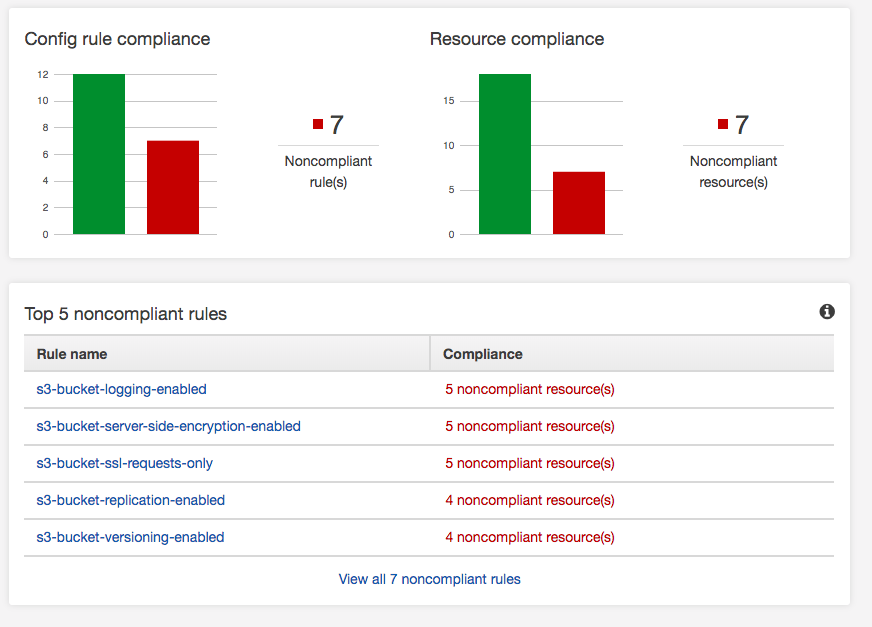 However, one of my findings yesterday was missing EBS encrypted volumes. In order to make EBS volumes encrypted its 9 easy steps:
-
Make a snapshot of the EBS Volumes.
-
Copy the snapshot of the EBS Volume to a Snapshot, but select encryption. Use the AWS KMS key you prefer or Amazon default aws/ebs.
-
Create an AMI image from the encrypted Snapshot.
-
Launch the AMI image from the encrypted Snapshot to create a new instance.
-
Check the new instance is functioning correctly, and there are no issues.
-
Update EIPs, load balancers, DNS, etc. to point to the new instance.
-
Stop the old un-encrypted instances.
-
Delete the un-encrypted snapshots.
-
Terminate the old un-encrypted instances.
Remember KMS gives you 20,000 request per month for free, then the service is billable.
If you have an AWS deployment, make sure you turn on AWS Config. It has a whole bunch of built-in rules, and you can add your own to validate the security of your AWS environment as it relates to AWS services. Amazon provides good documentation, a
Serverless is becoming the 2018 technology hype. I remember when containers were gaining traction in 2012, and Docker in 2013. At technology conventions, all the cool developers were using containers. It solved a lot of challenges, but it was not a silver bullet. (But that’s a blog article for another day.)
Today after an interview I was asking myself, have Containers lived up to the hype? They are great for CI/CD, getting rid of system administrator bottlenecks, helping with rapid deployment, and some would argue fundamental to DevOps. So I started researching the hype. People over at Cloud Foundry published a container report in 2017 and 2016.
Per the 2016 report, “our survey, a majority of companies (53%) had either deployed (22%) or were in the process of evaluating (31%) containers.”
Per the 2017 report, “increase of 14 points among users and evaluators for a total of 67 percent using (25%) or evaluating (42%).”
As a former technology VP/director/manager, I was always evaluating technology which had some potential to save costs, improve processes, speed development and improve production deployments. But a 25% adaption rate and a 3% uptick over last year, is not moving the technology needle.
However, I am starting to see the same trend, Serverless is the new exciting technology which is going to solve the development challenges, save costs, improve the development process and you are cool if you’re using it. But is it really Serverless or just a simpler way to use a container?
AWS Lambda is basically a container. (Another blog article will dig into the underpinnings of Lambda.) Where does the container run? ** A Server. **
Just means I don’t have to understand the underlying container, server etc.etc.etc. So is it truly serverless? Or is it just the 2018 technology hype to get all us development geeks excited, we don’t need to learn Docker or Kubernetes, or ask our Sysadmin friends provision us another server.
Let me know your thoughts.
Serverless is becoming the 2018 technology hype. I remember when containers were gaining traction in 2012, and Docker in 2013. At technology conventions, all the cool developers were using containers. It solved a lot of challenges, but it was not a silver bullet. (But that’s a blog article for another...
I sat the AWS Certified Solutions Architect - Professional exam this morning. This exam is hard, probably the hardest of the AWS exams I have taken to date. I did it in about half the allowed time. Generally, the test is challenging as it covers a lot of topics and each answer always had two correct choices. The entire exam is a challenge to pick the more correct answer based on the scenario and question with a driving factor of one more or more of the following, scalability, cost, recovery time, performance or security.
I felt like I passed the exam while doing it, but its always a relief to see:
Congratulations! You have successfully completed the AWS Certified Solutions Architect - Professional exam and you are now AWS Certified.
Here is my score breakdown from the exam.
Topic Level Scoring:
| 1.0 |
High Availability and Business Continuity: |
81% |
| 2.0 |
Costing: |
75% |
| 3.0 |
Deployment Management: |
85% |
| 4.0 |
Network Design: |
85% |
| 5.0 |
Data Storage: |
81% |
| 6.0 |
Security: |
85% |
| 7.0 |
Scalability & Elasticity: |
63% |
| 8.0 |
Cloud Migration & Hybrid Architecture: |
57% |
I sat the AWS Certified Solutions Architect - Professional exam this morning. This exam is hard, probably the hardest of the AWS exams I have taken to date. I did it in about half the allowed time. Generally, the test is challenging as it covers a lot of topics and...
I sat the AWS Certified SysOps Administrator - Associate this morning. That makes two exams this week in 3 days.
The exam was a little bit harder than the two other Associate exams as it went a level deeper. It focused on CloudFormation, CloudWatch, and deployment strategies. There were nine questions I struggled with the right answer, as all nine had two good answers. There were about 35 questions I knew cold. There were three questions duplicated on the other associate exams. All of the network questions I was over-thinking, probably based on the networking exam this week. Given this, I wasn’t worried when I ended the test. However, it’s always a relief when you get the Congratulations! You have successfully completed the AWS Certified SysOps Administrator - Associate.
Within 10 minutes I got my score email:
Congratulations again on your achievement!
Overall Score: 84%
Topic Level Scoring:
| 1.0 |
Monitoring and Metrics: |
80% |
| 2.0 |
High Availability: |
83% |
| 3.0 |
Analysis: |
100% |
| 4.0 |
Deployment and Provisioning: |
100% |
| 5.0 |
Data Management: |
83% |
| 6.0 |
Security: |
100% |
| 7.0 |
Networking: |
42% |
The score reflected over thinking the networking questions. I wouldn’t recommend sitting two different exams in the same few days.
That make 4 AWS certifications in 3 weeks:
- AWS Certified SysOps Administrator - Associate
- AWS Certified Advanced Networking - Specialty
- AWS Certified Developer - Associate
- AWS Certified Solutions Architect - Associate (Released February 2018)
Guess now it’s time to focus on the last of the Amazon Certifications I’ll work on for now which is the AWS Certified Solutions Architect – Professional.
I sat the AWS Certified SysOps Administrator - Associate this morning. That makes two exams this week in 3 days.
The exam was a little bit harder than the two other Associate exams as it went a level deeper. It focused on CloudFormation, CloudWatch, and deployment strategies. There were...
The material for the AWS Certified SysOps Administrator – Associate seems to be a lot of the material cover under the Associate Architect and Associate Developer. I would have thought the material more focus on setting up and troubleshooting issues with EC2, RDS, ELB, VPC etc. It also spends a lot of time looking at CloudWatch, but doesn’t really provide strategies for leveraging the logs. Studying was a combination of the acloud.guru and the official study guide, and the Amazon Whitepapers.
I took the AWS supplied practice test using a free test voucher and score the following:
| Congratulations! You have successfully completed the AWS Certified SysOps Administrator Associate - Practice Exam
|
| Overall Score: 90%
|
| Topic Level Scoring:
1.0 Monitoring and Metrics: 100%
2.0 High Availability: 100%
3.0 Analysis: 66%
4.0 Deployment and Provisioning: 100%
5.0 Data Management: 100%
6.0 Security: 100%
7.0 Networking: 66%
|
It interesting the networking score was so low as I just passed the Network Speciality.
This is the last Associate exam to pass for me. If I successfully pass it, I will begin the process of studying for the Certified Solution Architect - Professional. That will probably be my last AWS certification as I’ll look at either starting on something like TOGAF certification, Redhat or Linux Institute, Cisco, GCP or Azure, depending on where my interest lies in a few weeks.
The material for the AWS Certified SysOps Administrator – Associate seems to be a lot of the material cover under the Associate Architect and Associate Developer. I would have thought the material more focus on setting up and troubleshooting issues with EC2, RDS, ELB, VPC etc. It also spends a...
I passed the AWS Certified Advanced Networking – Specialty Exam this morning. The exam is hard. My career started with a networking as I had multiple Nortel and Cisco Certifications and was studying to the CCIE Lab back then. But over the last 12 years, I got away from networking. Doing this exam was going back to something I loved for a long time, as BGP, Networking, Load Balancers, WAF makes me excited.
My exam results
Topic Level Scoring:
1.0 Design and implement hybrid IT network architectures at scale: 75%
2.0 Design and implement AWS networks: 57%
3.0 Automate AWS tasks: 100%
4.0 Configure network integration with application services: 85%
5.0 Design and implement for security and compliance: 83%
6.0 Manage, optimize, and troubleshoot the network: 57%
I have limited experience with AWS networking prior to this exam. I had the standard things likes load balancers, VPCs, Elastic IPs and Route 53. This exam tests your knowledge of these areas and more. To prepare I used the acloud.guru course, also the book AWS Certified Advanced Networking Official Study Guide: Specialty Exam and the Udemy Practice Tests. With the course and book, I set up VPC peers, Endpoints, nat instances, gateways, CloudFront distributions. I put about 50 hours into doing the course, reading the book, doing various exercise, and studying etc.
Based on my experience the acloud.guru course is lacking the details on the ELBs, the WAF, private DNS, and implementation within CloudFormation. The book comes closer to the exam, but also doesn’t cover CloudFormation, WAF or ELBs as deep as the exam. The Udemy practice tests were close to the exam, but lack some of the more complex scenario questions.
I plan to sit the AWS Certified SysOps Administrator - Associate exam later this week.
I passed the AWS Certified Advanced Networking – Specialty Exam this morning. The exam is hard. My career started with a networking as I had multiple Nortel and Cisco Certifications and was studying to the CCIE Lab back then. But over the last 12 years, I got away from networking. ...
The pdf provided this:
The AWS Certified Solutions Architect - Associate (Released February 2018) (SAA-C01) has a scaled score between 100 and 1,000. The scaled score needed to pass the exam is 720.
I got a 932….
The pdf provided this:
The AWS Certified Solutions Architect - Associate (Released February 2018) (SAA-C01) has a scaled score between 100 and 1,000. The scaled score needed to pass the exam is 720.
I got a 932….
I sat the exam for the AWS Certified Developer - Associate this morning. I felt lucky as the system kept asking questions I knew in depth. There were only 4 questions I didn’t know the answer to and took an educated guess.
I did the exam in 20 minutes for 55 questions. I only review questions I flag, and I only flagged about 8 questions. I felt really lucky as the exam was playing to my knowledge of DynamoDB, S3, EC2, and IAM. There were other questions about Lambda, CloudFormation, CloudFront, and API calls. But the majority of the questions focused on 4 areas of AWS, I knew really well.
At the end of the exam, I got the Congratulations have successfully completed the AWS Certified Developer – Associate exam.
Also within 15 minutes, I got the email confirming my score:
Congratulations again on your achievement!
Overall Score: 90%
| 1.0 |
AWS Fundamentals: |
100% |
| 2.0 |
Designing and Developing: |
85% |
| 3.0 |
Deployment and Security: |
87% |
| 4.0 |
Debugging: |
100% |
I’m still waiting on my score from my Solution Architect - Associate Exam. In the meantime, I’ll get back to studying my AWS Networking Speciality.
I sat the exam for the AWS Certified Developer - Associate this morning. I felt lucky as the system kept asking questions I knew in depth. There were only 4 questions I didn’t know the answer to and took an educated guess.
I did the exam in 20 minutes...
AWS offers practices emails through PSI exams. Cost $20 and gives you 20 questions for practice. I did the exam today. Here is the results email.
| Congratulations! You have successfully completed the AWS Certified Developer Associate - Practice Exam
|
| Overall Score: 95%
|
| Topic Level Scoring:
1.0 AWS Fundamentals: 100%
2.0 Designing and Developing: 87%
3.0 Deployment and Security: 100%
4.0 Debugging: 100%
|
That’s a confidence builder going into the exam tomorrow morning.
AWS offers practices emails through PSI exams. Cost $20 and gives you 20 questions for practice. I did the exam today. Here is the results email.
| Congratulations! You have successfully completed the AWS Certified Developer Associate - Practice Exam |
| Overall Score: 95% |
...
I had scheduled the test for June 14 for AWS Certified Developer – Associate. I need to stop studying the Network information and finish studying for the developer exam. I had completed the https://acloud.guru/ course on Sunday. I decided to purchase AWS Certified Developer - Associate Guide: Your one-stop solution to passing the AWS developer’s certification
The book was good, it covers all the major topics for the associate developer certification, but it lacks hands-on lab and there are several errors in the mock exams.
I had scheduled the test for June 14 for AWS Certified Developer – Associate. I need to stop studying the Network information and finish studying for the developer exam. I had completed the https://acloud.guru/ course on Sunday. I decided to purchase AWS Certified Developer - Associate Guide: Your...
Still waiting on the score from the AWS Certified Solution Architect – Associate exam.
However, I started also studying for the AWS Certified Advanced Network - Speciality.
I love networks and networking, especially VPNs and BGP. So I felt it was a good challenge as well as something I enjoyed doing. 12 years ago, I had multiple Cisco routers on my desk and would run BGP configurations, OSPF and EIGRP configurations. Maybe I need an AWS DirectConnect…..
Still waiting on the score from the AWS Certified Solution Architect – Associate exam.
However, I started also studying for the AWS Certified Advanced Network - Speciality.
I love networks and networking, especially VPNs and BGP. So I felt it was a good challenge as well as something I enjoyed...
I sat the AWS Certified Solution Architect - Associate exam. It was challenging as it covers a broad set of AWS services. I sat the February 2018 version which is the new one.
At the end of the exam, I got a Congratulations have successfully completed the AWS Certified Solution Architect - Associate exam.
I decided that I would complete the AWS Certified Developer - Associate next.
I sat the AWS Certified Solution Architect - Associate exam. It was challenging as it covers a broad set of AWS services. I sat the February 2018 version which is the new one.
At the end of the exam, I got a Congratulations have successfully completed the AWS Certified Solution...
AWS offers practices emails through PSI exams. Cost $20 and gives you 20 questions for practice. I did the practice exam today. Here is the results email.
| Thank you for taking the AWS Certified Solutions Architect - Associate - Practice (Released February 2018) exam. Please examine the following information to determine which topics may require additional preparation.
|
| Overall Score: 80%
|
| Topic Level Scoring:
1.0 Design Resilient Architectures: 100%
2.0 Define Performant Architectures: 71%
3.0 Specify Secure Applications and Architectures: 66%
4.0 Design Cost-Optimized Architectures: 50%
5.0 Define Operationally-Excellent Architectures: 100%
|
I was a little concerned after the practice exam. I spent the rest of the evening studying. There various blogs which talk about the exam, but it seems depending on the day, exam, the location you could need anywhere from a 65% to a 72% to pass the exam. Based on the practice I didn’t have a lot of room for error.
AWS offers practices emails through PSI exams. Cost $20 and gives you 20 questions for practice. I did the practice exam today. Here is the results email.
| Thank you for taking the AWS Certified Solutions Architect - Associate - Practice (Released February 2018) exam. Please examine the...
|
